Setup and use Line item charges
Introduction
Background
In D365 FO there is a possibility to add charges on purchase order lines as well as on the purchase order itself.
Use of line item charges is for customers who are working with a specific kind of charges such as alloy charges where the charge
itself can widely exceed the item cost on the line and it is important to be able to both match the invoice line
charge with the registered expected charge on the purchase order line and also post charges directly on
the invoice line.
Working with invoice charges on the line level also makes it possible to make sure that the charge financial postings follows the item cost on the line.
Some customers also want to be able to add invoice line charges on the lines without having charges
registered on the purchase order lines. This kind of situation would always cause a matching error using
standard D365FO matching functionality and would mean that all lines would have to be manually
approved.
For automation purposes these invoice line will in ExFlow be system approved and instead you
can set up a maximum charge amount and only charges that exceeds this amount will need manual
approval.
The functionality for handling charges on line level in ExFlow includes the following:
- Interpret charges on line level on the invoice and add the charges to the connected invoice lines by using attributes in the XML invoice file.
- Interpret item charges on the header level on the invoice and have the charges auto allocated to the invoice lines upon import.
- Manually add line charges in ExFlow import and document forms.
- Add item charges on the header level and allocate these to the invoice lines using ExFlow import and document forms.
- Override the suggested tax groups for line charges and also have the tax groups interpreted and translated by using attributes.
- Information on calculated VAT based on the charge tax groups is shown in ExFlow import and document forms.
- Use line charges information in all ExFlow workflows such as validation workflows, advanced approval workflows etc.
- A new invoice line charge form is added with an overview information about all line charges on all invoice lines for a specific invoice. This form is also prepared for personalization, which gives the possibility to add more fields in the form showing purchase order line information and invoice line information.
- Possibility to set up matching rules for system approval of line charges based on table/group/all for vendors and charge codes.
Limitations
Line item charges functionality is valid from ExFlow version 2.8.1.
- Line item charges can only be used with the ExFlow line types item for purchase order invoices.
- A line item charge is always connected to an ExFlow item invoice line (the line item charge costs cannot be sent out on its own to an approver).
- In the approver user interface all line item charges for each individual row will be summarized. The details for the charges are not shown for the approvers. (It can be seen for purchase payable admins). In later versions this will be available also for the approvers.
Prerequisites
- Purchase order matching has to be setup in standard D365 FO before this functionality could be used.
- Charges have to be setup in standard D365 FO.
- Tolerance levels for charges may be setup in standard FO.
- Line item charges have to be switched on in ExFlow parameters.
- Tolerance levels in ExFlow setup found in the form Automatic postings can be setup for charges handling otherwise default parameters will be used.
- If line item charges should be imported a new node have to be added to the ExFlow XML format <"LineCharges">.
- If charges is imported on header level and should be automatically allocated upon import, the charge code has to be setup in ExFlow Automatic postings form tab; Allocate charges.
- If ExFlow parameter Auto get purchase order charges is switched on, only charges with Compare purchase order and invoice values field set to
Yeswill be auto copied.
Setup and configuration
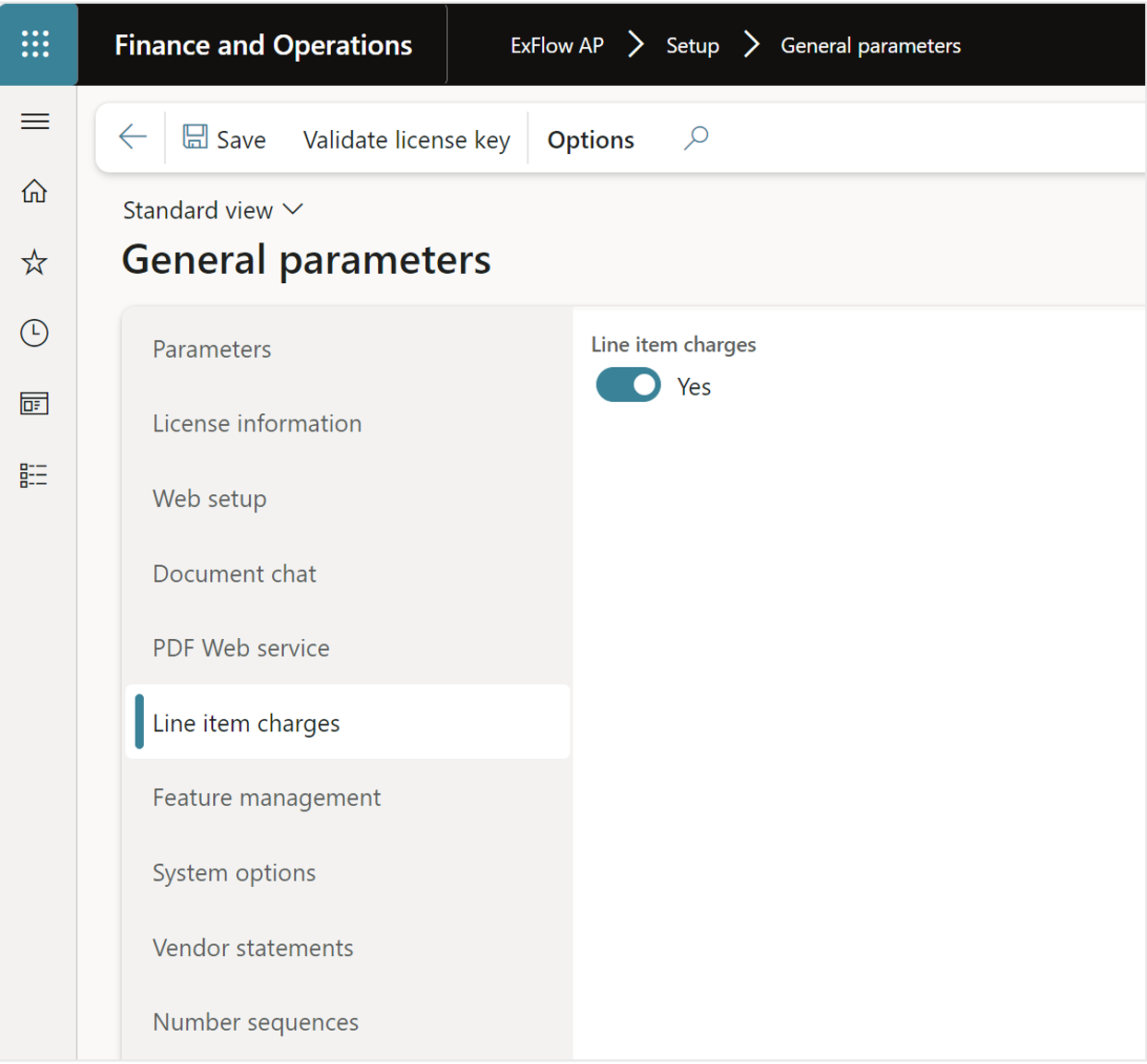
ExFlow general parameters
ExFlow | Setup | General parameters | Line item charges
To use Line item charges the parameter has to be switched on in ExFlow General parameters to be able to access the settings in ExFlow parameters per company.
ExFlow parameters
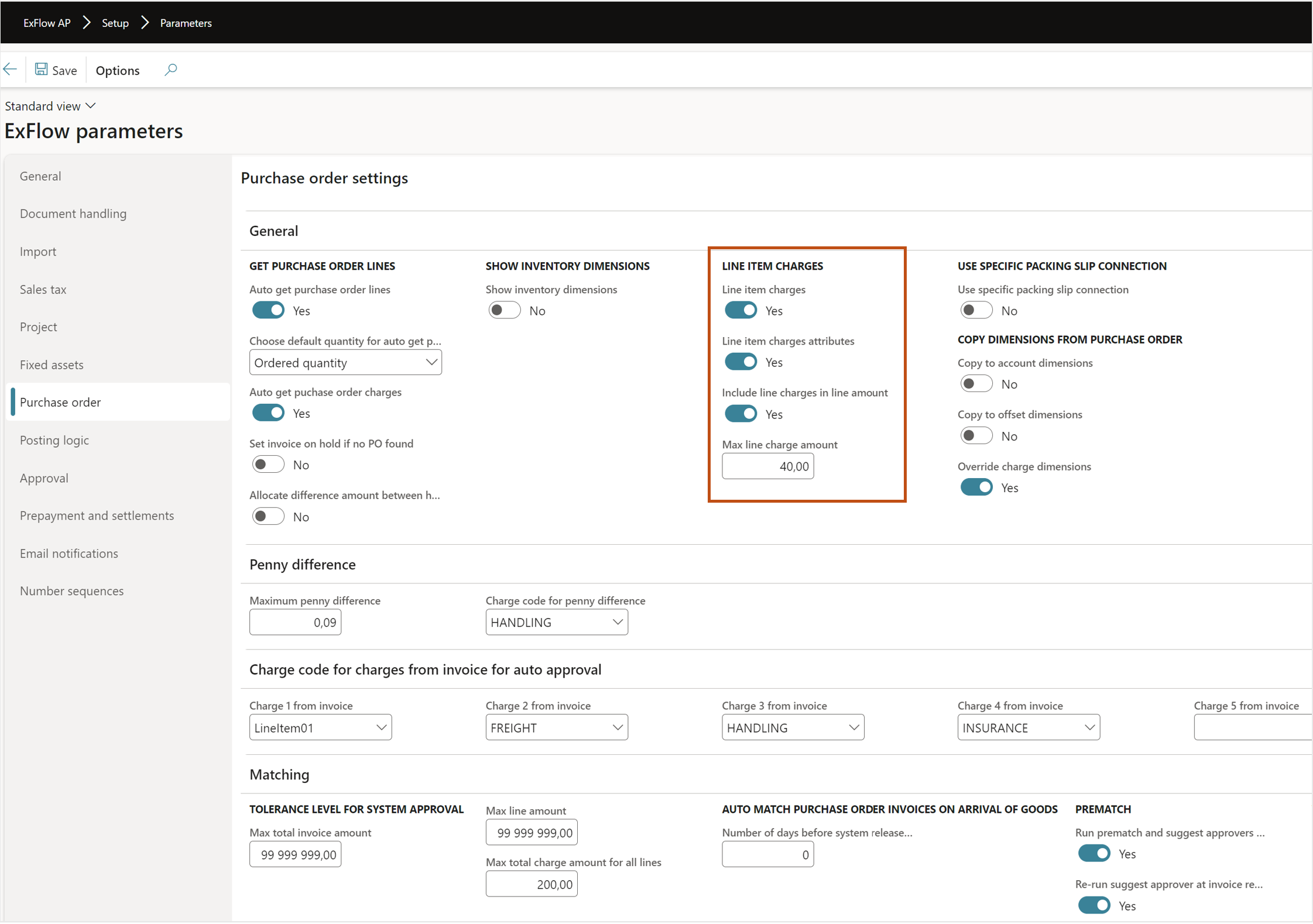
ExFlow | Setup | Parameters
Set the parameters for line item charges.
To deep dive and get all the parameters explained for general ExFlow setup see separate section in the document platform.
https://docs.signupsoftware.com/finance-operations/docs/user-manual/get-started/parameters#purchase-order
| Line item charges | |
|---|---|
| Line item charges | Set to yes if line item charges should be used. |
| Line item charges attributes | Set to yes if line item charges should be imported via file within the attributes functionality. Please note that the general attribute parameter for ExFlow has to be switched |
| on in the tab Import “Enable import attributes”. | |
| Invoice line charges in line amount | If the charges amount should be included in the line amount when used for workflows checking approval limits or when the approval amount control is used to include the line charge amount. |
| Max line charge amount | The fall back parameter for the total amount of line charges that should get automatically approved if the sum of all line charges that are the same and are below this amount. |
| Charge code for charges from invoice for auto approval | |
|---|---|
| Charge 1-5 from invoice | These fields are setup to determine which charge types that should be used when importing charges values on header level via Misc fields 1-5. If any of them are setup with an item charge they will be auto allocated on the lines. |
| Other fields | The other fields in this screen shoot are explained in the document platfor and are used for standard header charges and purchase order invoice matching. |
Allocate charges
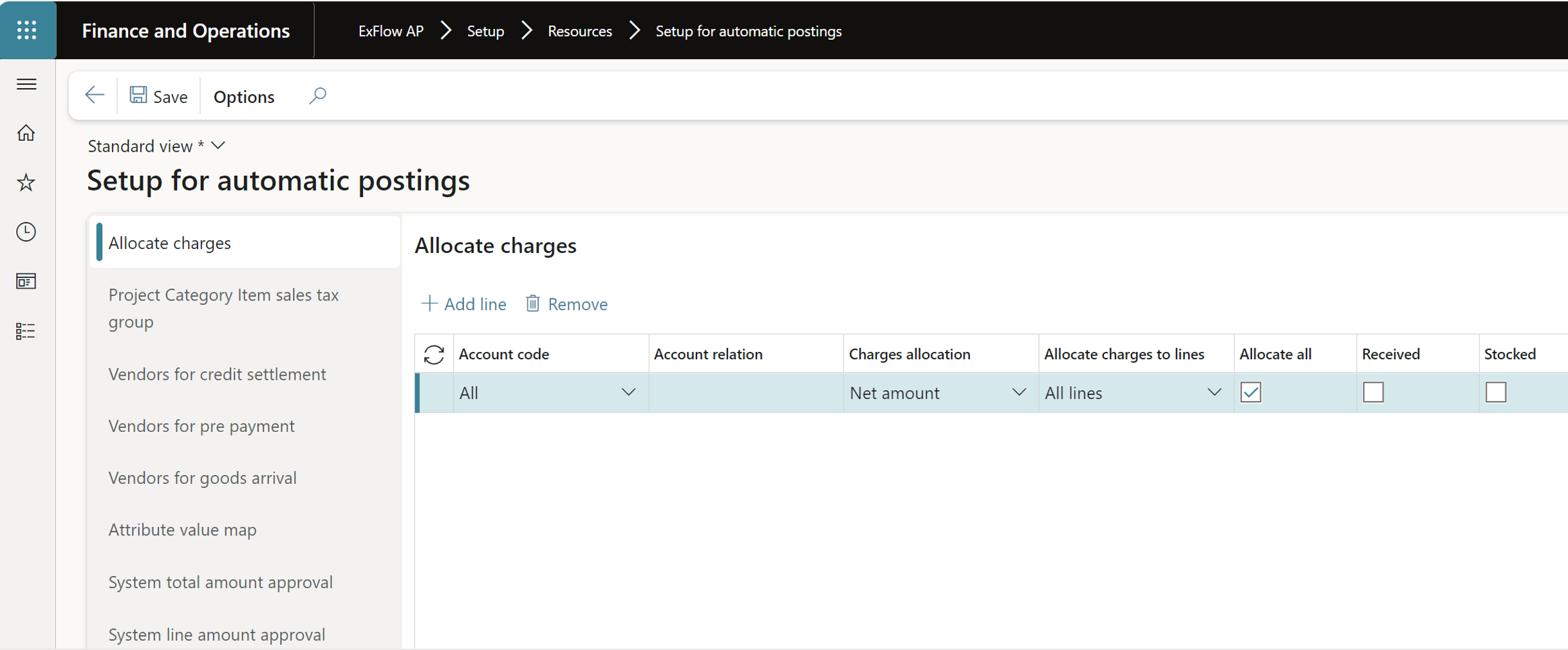
ExFlow | Setup | Resources | Setup for automatic postings | Allocate charges
If charges are imported on header level on ExFlow invoices (Misc fields 1-5) and one or more of them are setup as allocated charges (item charges) in std D365 FO. The allocation can be setup in this form to auto allocate those charges when the invoice is imported in ExFlow Import form, if the “Line charges” parameter is set to yes in ExFlow
parameters.
If “Line charges” parameter is set to No and only header charges is used the auto allocation is made when the purchase order invoice is finally posted either manually from ExFlow document form or via the Purchase order posting batch job.
Charges tolerances (D365)
D365 | Account payable | Invoice matching setup | Charges tolerance
This setup is in standard D365 FO where you can setup charges codes and the allowed tolerance level for matching between a charge on the purchase order and the charge on the invoice. If the difference is larger than the tolerance level it will result in a matching charge error.
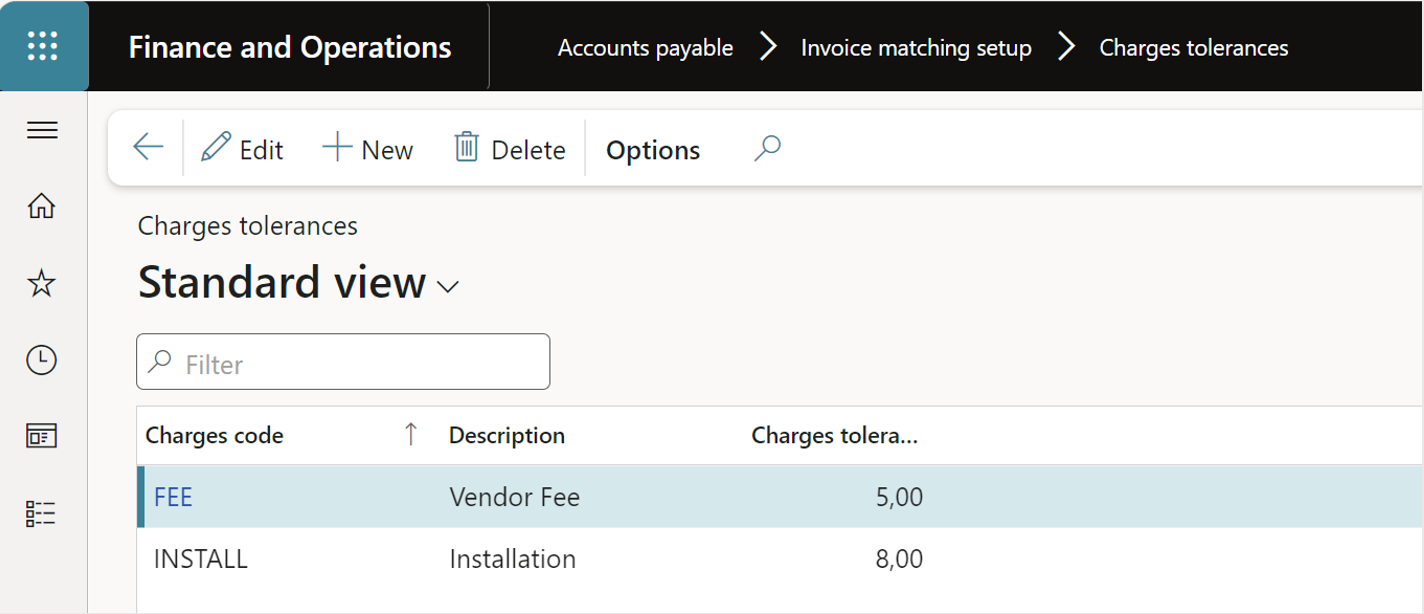
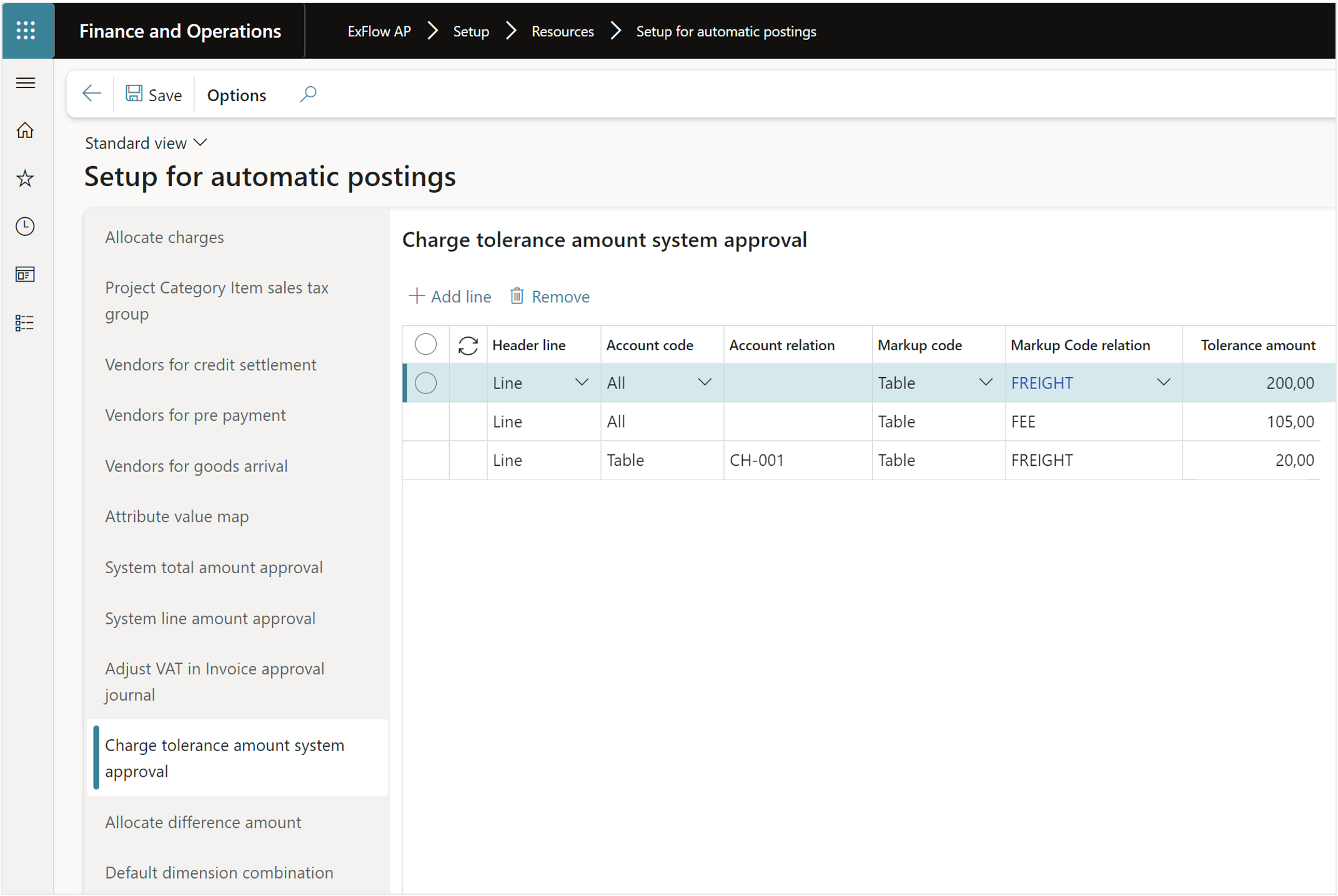
Charges tolerance amount system approval (ExFlow)
ExFlow | Setup | Resources | Setup for automatic postings | Charges tolerance amount system approval
This form is for to setup unique tolerance amount per charge type and is used for the system to decide if a line charge should be system approved or sent out for manual approval.
Charges tolerances mentioned in the section before in standard D365 FO handles the match error between a charge on the purchase order and the invoice.
Std D365 will always set a line to charges error if there are no charges on the purchase order to match against. However in ExFlow this setting will override the charge error if it is equal or below the tolerance amount and set the line to system approved (ExFlow will summarize the same charge types on all rows in its comparison). When the final posting of the invoice is made ExFlow will add the charge to the financial posting of the purchase order invoice even if it will not exist on the purchase order from the start.
The process of the matching with charges and the different tolerance levels works as follows;
- The first matching will be based on the standard D365FO setting, #"Charges
tolerances" for each line.
- If the charge is not setup in "Charges tolerances" it will base the setting on the std D365 FO Accounts payable parameter in Invoice validation/Charges matching.
- In this step ExFlow will check the actual approval of the invoice, ExFlow summarize all charges of the same type and compare against the setting in Setup for automatic posting/Charge tolerance system approval.
- If the charge is not setup in Charge tolerance system approval ExFlow will compare the values from the lines against ExFlow parameters/Purchase order/Line item charges/Max line charge amount setting, to see if the line should be system approved or sent out for manual approval.
Setup Attributes
ExFlow | Setup | Resources | Setup for automatic posting | Attribute value map
Line charges values can be imported automatically into ExFlow by adding the keys <"LineCharges"> in the <"Invoice Line"> section.
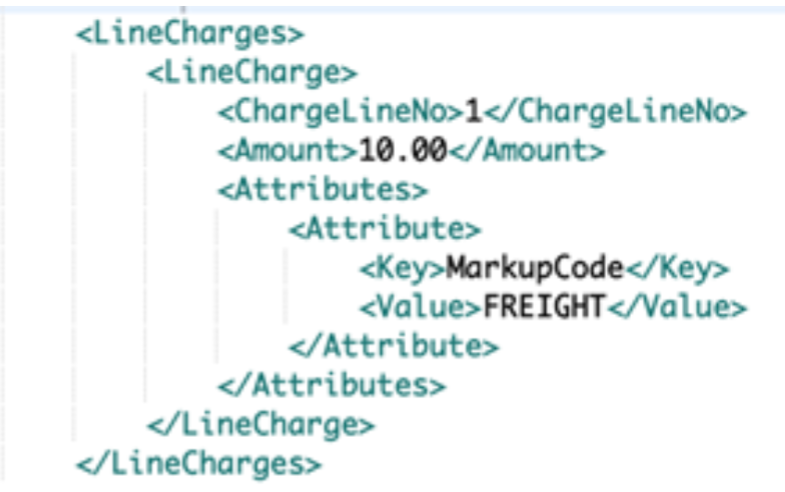
If the file is sent in with the predefined keys <"Amount"> and <"MarkupCode"> no extra setup is required besides enabling the import of attributes in ExFlow parameters/Import/Attributes/Enable import attributes and make sure the correct keys are used. It is also supported to import unique tax settings for each charge.
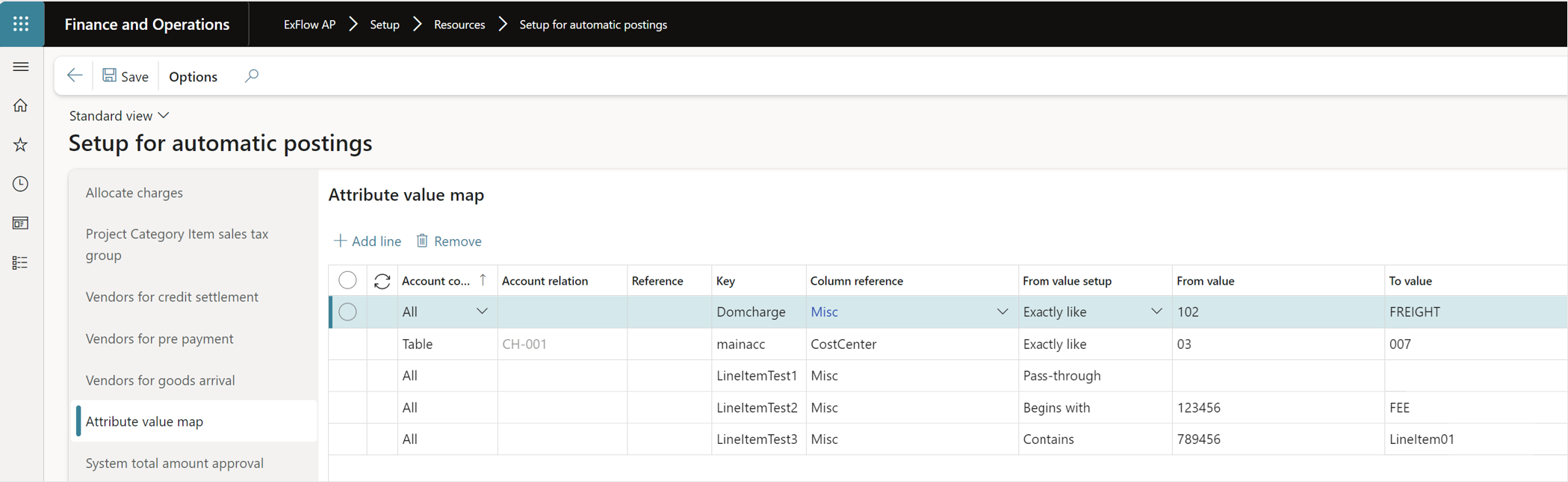
If more complex setup is needed for example if the imported <"MarkupCode"> key is named <"Domcharge"> or the charge value is "102” and needs to be translated to “Freight” to correspond with the charges setup within D365FO the Attribute value map in ExFlow/Setup/Setup for automatic postings has to be setup.
As seen in the picture below the key in the file is set to “Domcharge” and will be treated as a charge. If the value in the file is 102 it will be transformed to “Freight”.
Line charges fields in workflows
The Line item charges fields are added as a separate group and accessible in the available ExFlow workflows found under the menu exit Import Line/Line item charges for the criteria’s in the workflows.
When working with line amounts for approval and signing limits used in workflows, the ExFlow parameter “Include Line charge amount” decide if the charge amount should be included in the line net amount.
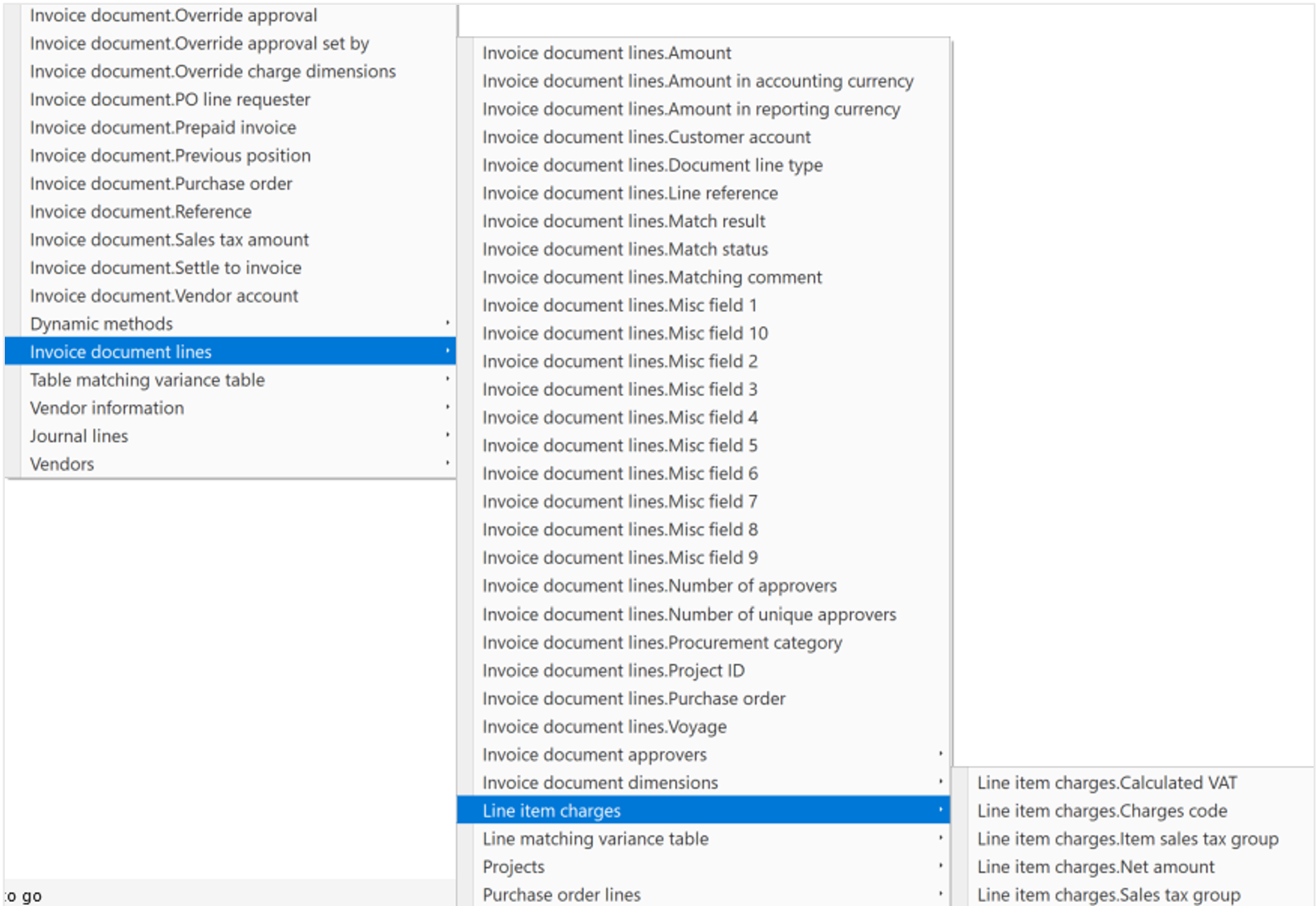
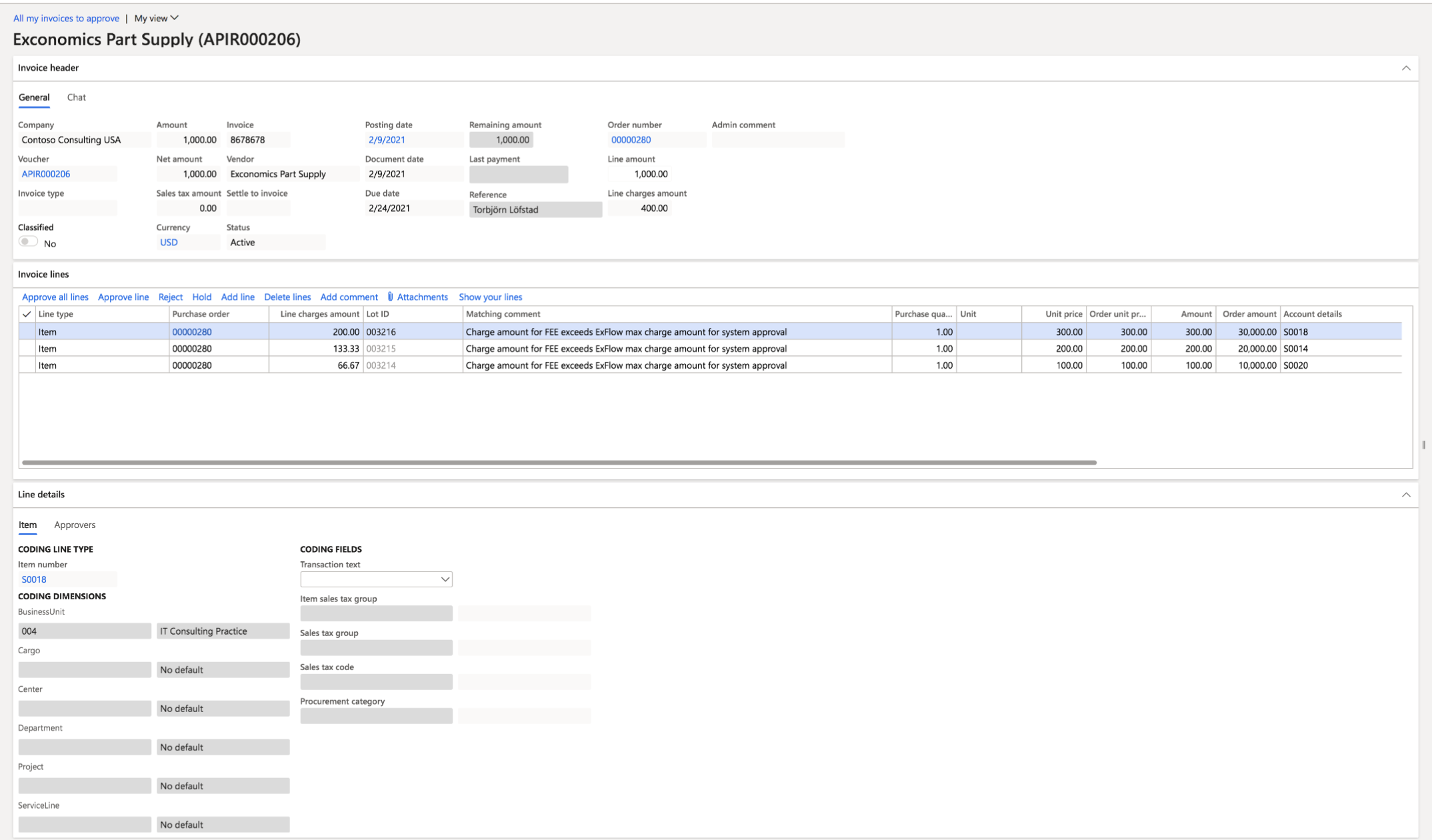
Example of invoice with the Line item charges process
ExFlow | Invoices | Import form
There are two new menu exits and a new field when working with line charges in ExFlow import form and document form.
One in the header menu in General/Invoice line charges that display all the line charges for the invoice.

The other menu exit on the lines “Line item charges” display the line charges connected to the marked line.
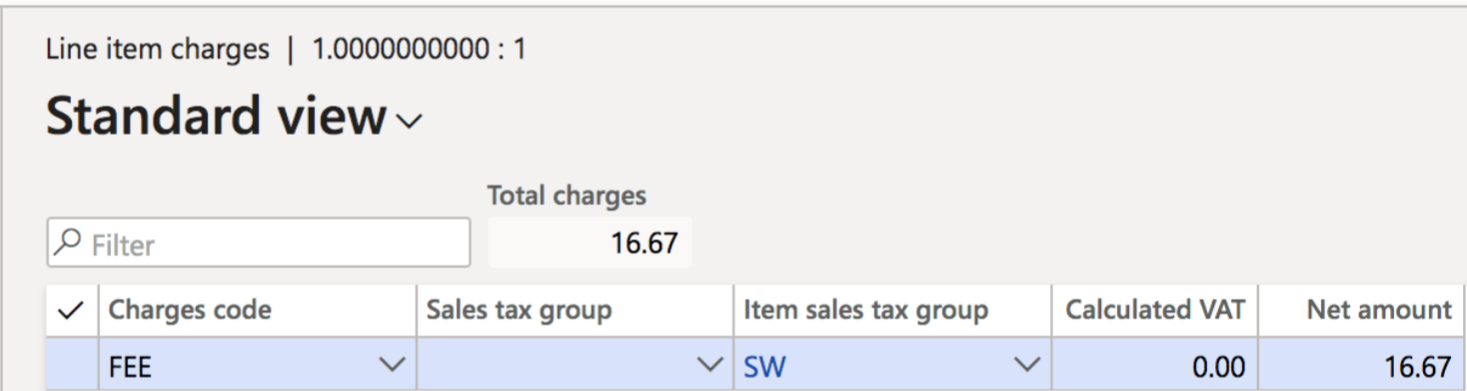
A new field is added on the lines “Line charges” displaying the sum of all charges connected to the line.

Invoice with line charges in the file
The red arrows points towards the new field and menu exits.
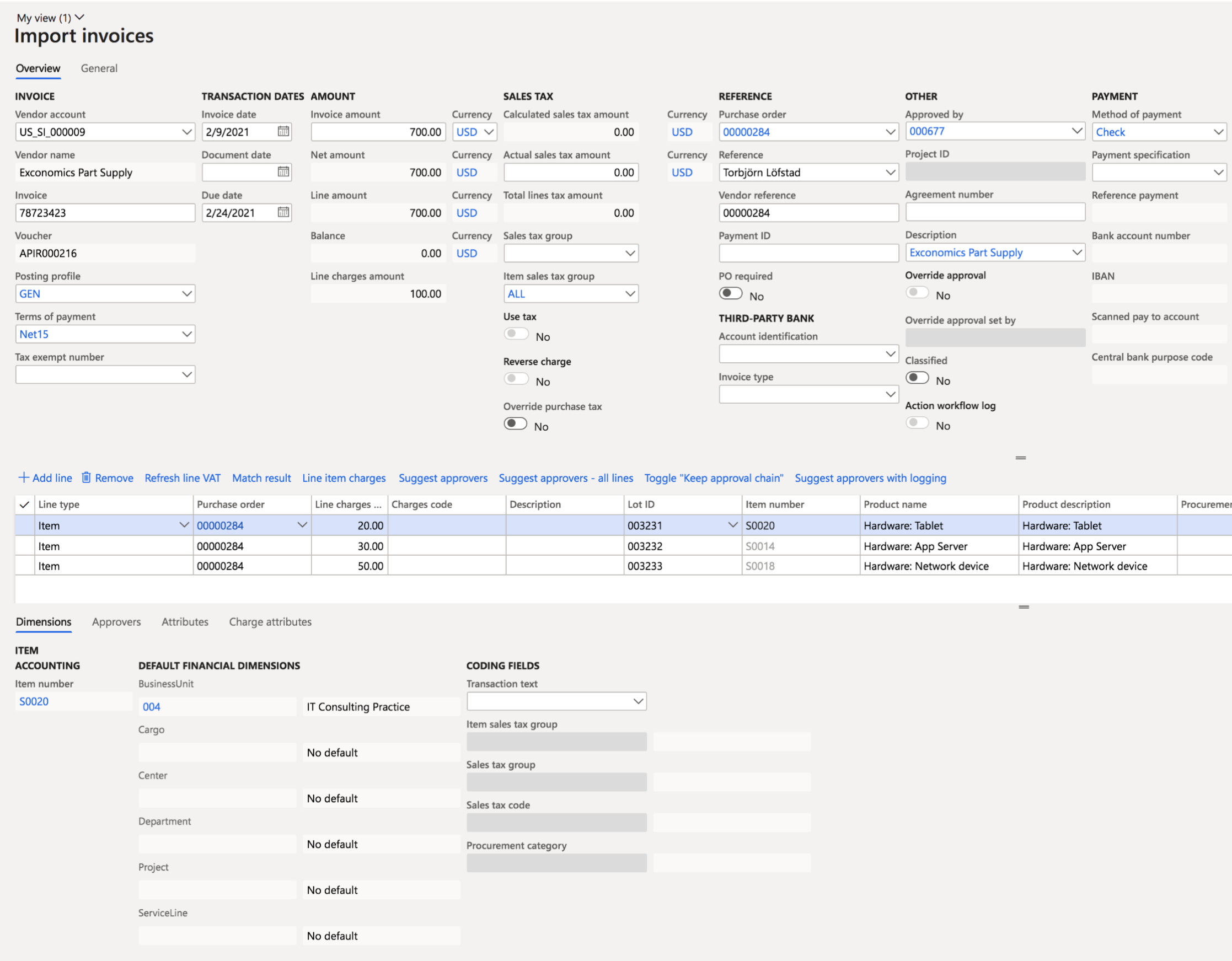
- The invoice is imported with line item charges on each line already included in the imported file as can be seen in the Line charges field.
- Invoice matching is made both on the item itself for quantity, price and charges values.
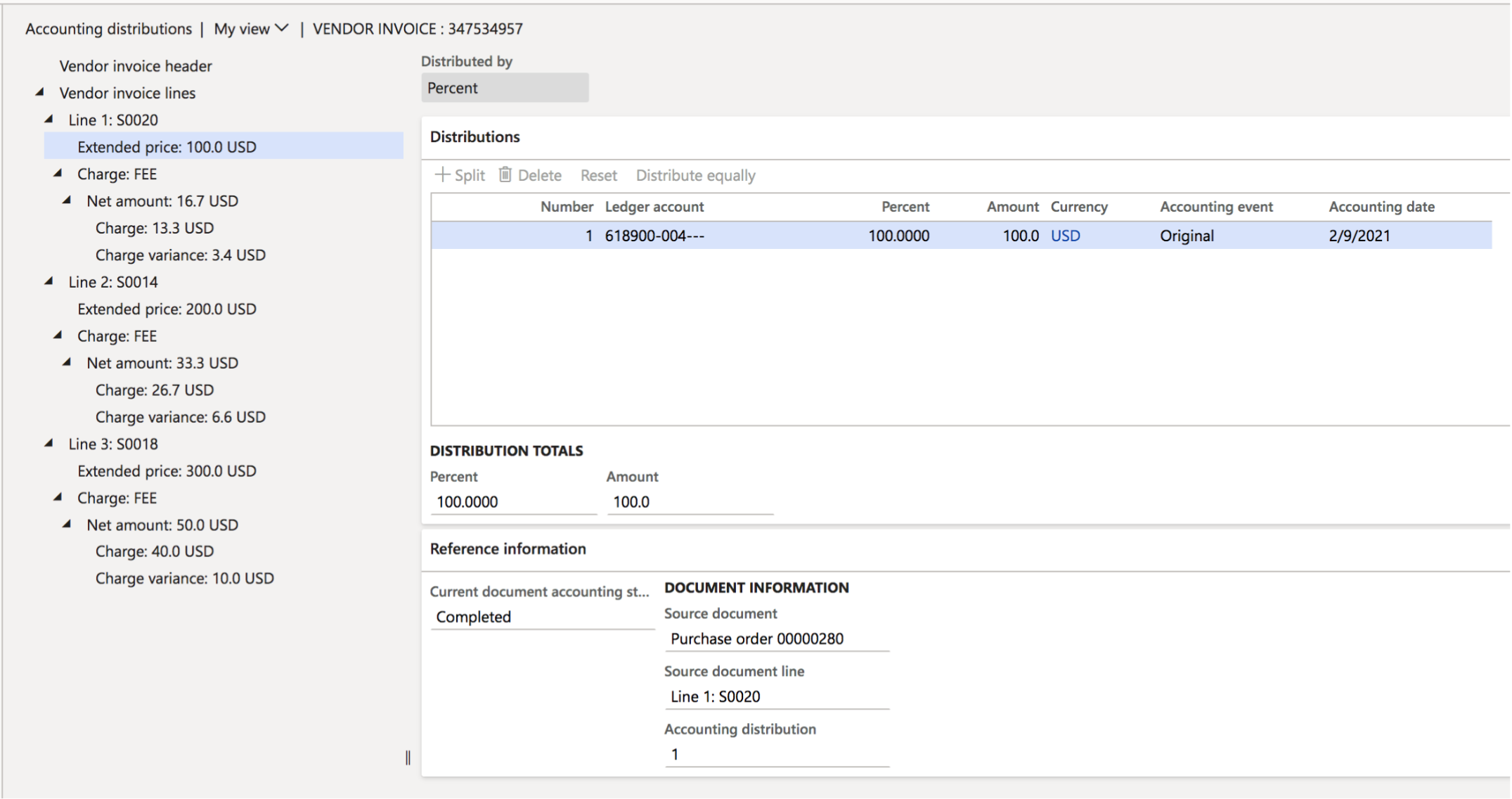
- The invoice is posted and sent out for approval or is automatically matched and system approved and finally approved.
- When viewing the posted invoice in accounting distribution we can see that it has compared the charges already on the purchase order and also added the difference based on the amount on the invoice.
Invoice imported with item charges on the header that auto allocates
- An invoice is imported with an item charge on header level (Misc fields), depending on the setting in ExFlow parameters the type of charge is determined.
- If the charge is of the type item charge the charge line will not be created in the import form it will instead be auto allocated for the item lines and will not be visible as a separate row as in the image below.
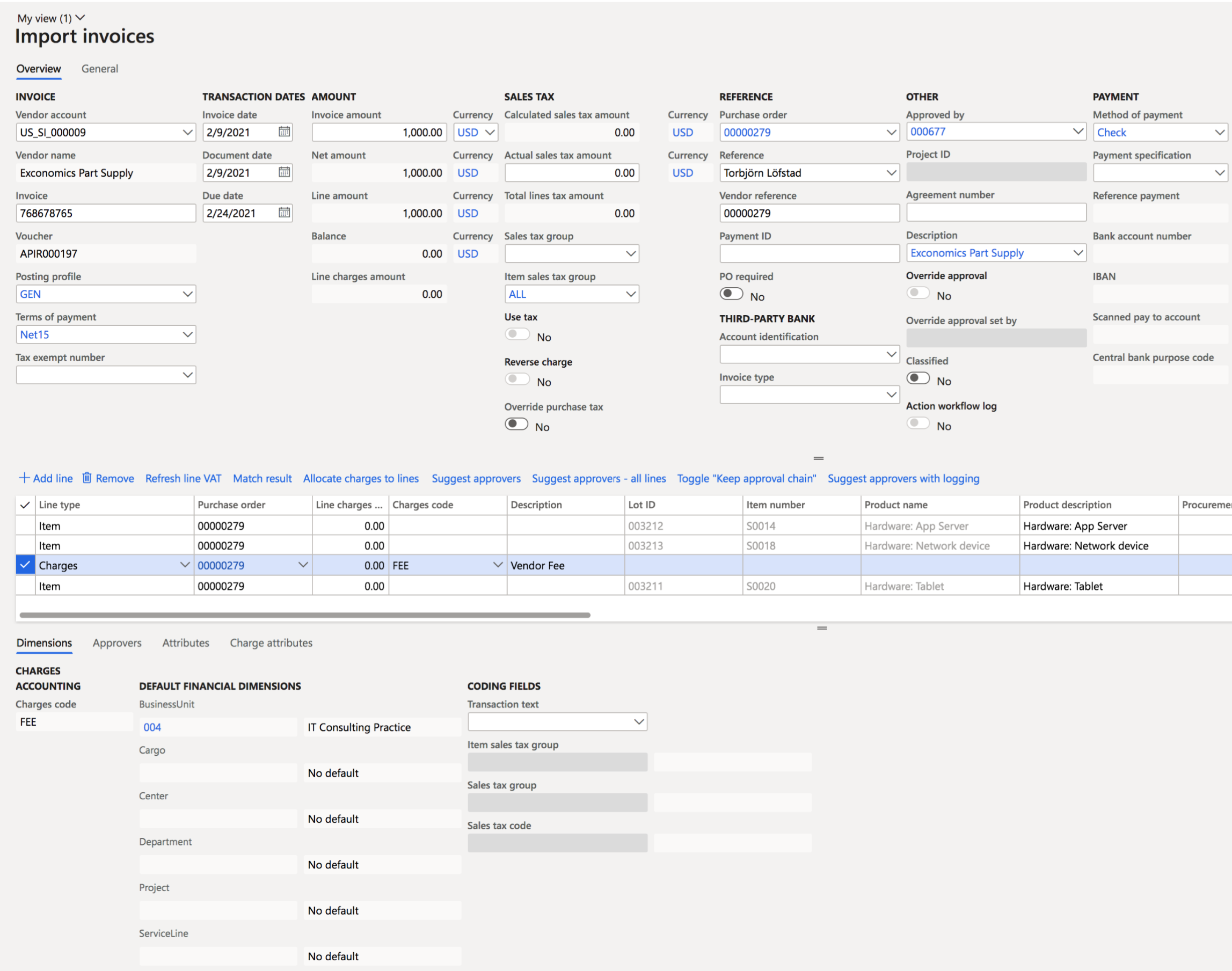

- For this example I have manually created the charge line and used the “Allocate charges to line” button (the red arrow) to distribute the cost on the three lines as can be seen in the line charges field (400:- has been allocated on the three lines).
- Invoice matching is made both on the item itself for quantity, price and charges values.
- The invoice is posted and sent out for approval or is automatically matched and system approved and finally approved.
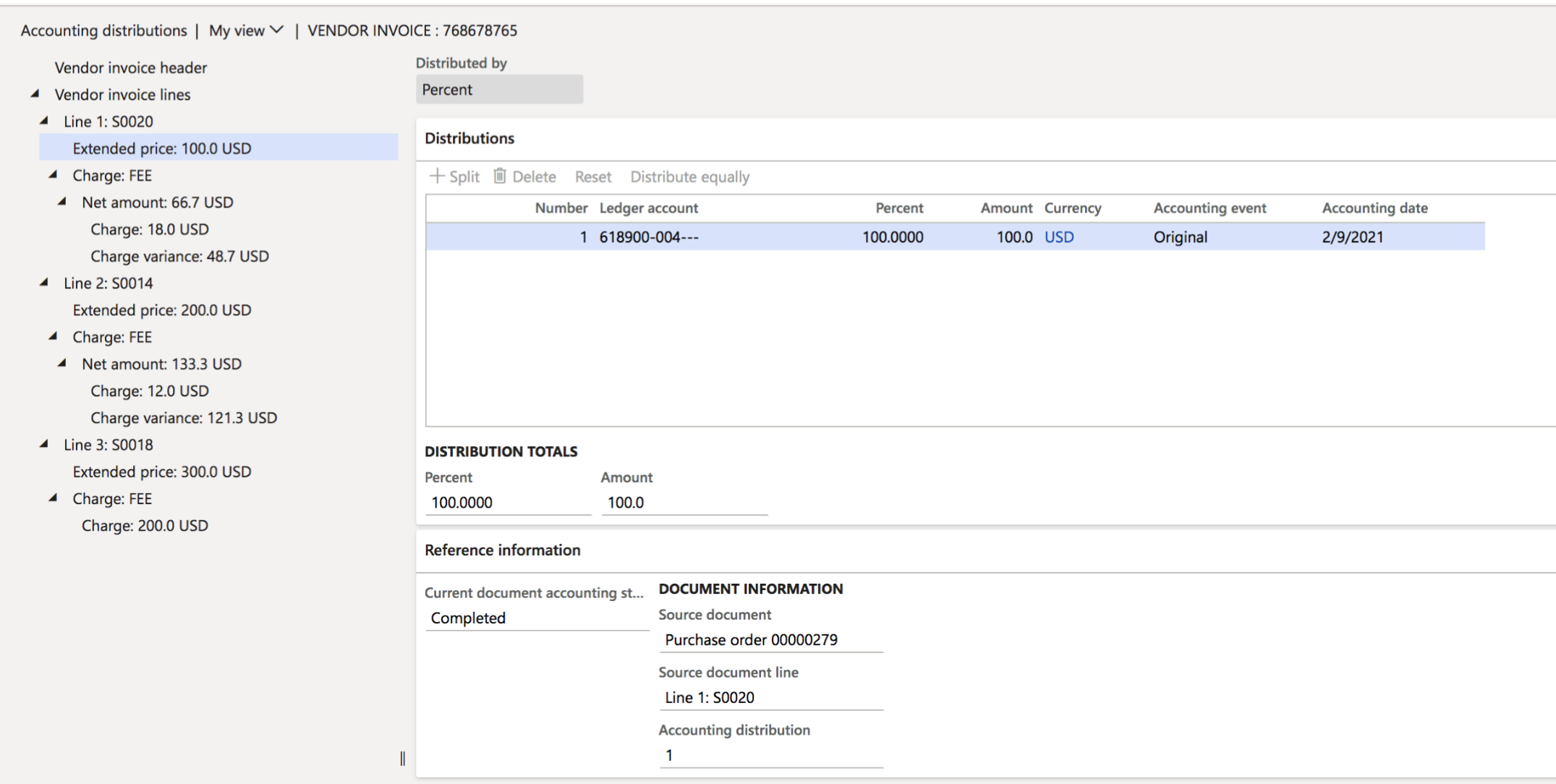
- When viewing the posted invoice in accounting distribution we can see that it has compared the charges already on the purchase order and also added the difference based on the amount on the invoice. The last line with Charge FEE of 200 USD did not exist on the order but was added from the invoice.
Invoices imported with different types of charges
ExFlow support all the different types of charges on both header and line level or both in combination.
- A charge can be on imported from the file on line level. It can be both an item charge and a ”normal” charge.
- A charge or several charges can be imported on header level as an item charge or as a ”normal” charge.
- Manual charges can be added on the lines when working with the invoice and either be allocated to the lines depending on the type of charge or just be for example a freight charge on header level.
- Summary invoices with different purchase order numbers per line is supported and allocation of item charges can be made on all the lines.
- All of the combinations above can mixed on the same invoice.
Approval
In the ExFlow form ”All my vendor invoices to approve” the field ”Line charges amount” is visible and the matching comment. In ExFlow web the charges amount is taken into consideration in validation but is in
this first version not visible for the approver.